




INTRODUCTION
The advent of modern smartphone technology has revolutionized the world of filmmaking, offering Kingdom filmmakers a powerful and accessible tool to convey their messages effectively. This comprehensive guide aims to provide a step-by-step approach to shooting movies with a smartphone, focusing on key aspects such as storytelling, camera techniques, audio, and post-production.
By adhering to professional filmmaking principles, Kingdom filmmakers can elevate their projects and engage their
audience on a deeper level.
STEP 1
STORY TELLING AND PREPRODUCTION
Psalm 96:3 (NIV): “Declare his glory among the nations, his marvelous deeds among all peoples.”
Proverbs 16:3 (NIV): “Commit to the Lord whatever you do, and he will establish your plans.”
• Establish a clear purpose and message for your movie that aligns with your Kingdom
filmmaking vision.
• Craft a compelling script or outline that drives the narrative and evokes emotional resonance.
• Conduct thorough pre production planning, including location scouting, casting, and
securing necessary props and permits.
• Storyboard and visualize the scenes to ensure a cohesive and impactful storyline.
STEP 2
SMARTPHONE CAMERA PREPARATION
• Select a smartphone with a high-quality camera and advanced video capabilities.
• Install professional-grade filmmaking apps that offer manual controls for focus,
exposure, and frame rates, enabling greater creative control.
Recommended Apps:
Camera FV-5, Filmic Pro e.t.c.
STEP 3
COMPOSITION AND FRAMING
• Apply fundamental principles of composition, such as the rule of thirds and leading lines, to create visually compelling frames.
• Experiment with various angles and perspectives to add depth and intrigue to your shots.
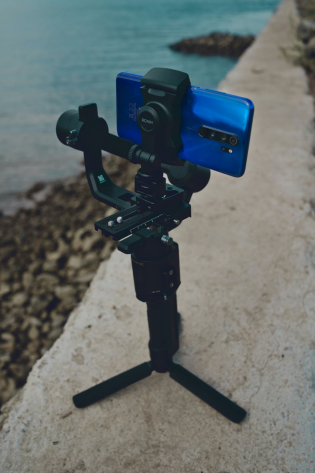
• Utilize smartphone stabilizers or gimbals to achieve steady shots and minimize camera shake.

STEP 4
LIGHTING MASTERY
• Leverage natural lighting whenever possible, as it enhances the authenticity and cinematic quality of the footage.
• Shoot during the golden hour, either early morning or late afternoon, to achieve flattering and aesthetically pleasing lighting
conditions.
• Utilize portable LED lights or
reflectors to shape and control lighting in indoor or low-light environments.
STEP 5
AUDIO EXCELLENCE
• Invest in high-quality smartphone compatible external microphones to capture clear and professional audio.
• Employ windscreens or deadcats to reduce wind noise during outdoor shoots.
• Monitor audio levels diligently to maintain optimal quality and avoid distortions.
STEP 6
MASTERING FILMING TECHNIQUES
• Embrace a diverse range of camera movements, such as panning, tilting, and tracking, to add dynamism and sophistication to your shots.
• Leverage slow-motion or time-lapse features to create captivating visual effects and enhance storytelling.
• Ensure consistent framing and continuity throughout the film to maintain coherence.

STEP 7
POST PRODUCTION EXPERTISE
• Transfer your footage to a computer and utilize industry standard video editing software for precise control and seamless project management.
• Organize clips efficiently and trim superfluous footage to streamline the narrative flow.
• Enhance your movie with seamless transitions, compelling effects, and professionally designed titles.
Recommended Apps:
Adobe Premiere Rush, iMovie etc
STEP 8
SOUND DESIGN AND MUSIC SELECTION
• Edit and optimize audio elements, striking the right balance between dialogue, sound effects, and music.
• Carefully select royaltyfree or original music that complements the movie’s mood and tone.
• Ensure audio levels and clarity remain consistent throughout the film.
Recommended Apps:
GarageBand, Epidemic Sound
STEP 9
CINEMATIC COLOR GRADING
• Implement skillful color grading techniques to achieve a polished and cinematic visual appeal.
• Utilize color to evoke emotions and reinforce storytelling elements effectively.
Recommended Apps:
FiLMiC Pro LUT Pack, Luma Fusion, Adobe Lightroom Mobile, KineMaster Pro, Cyberlink Power Director, Capcut etc
STEP 10
EXPORTING AND PROMOTION
• Export the movie in the appropriate format and resolution for your desired platform, be it YouTube, Vimeo, or film festivals.
• Craft engaging trailers or teasers to pique audience interest and drive anticipation.
• Foster audience engagement through social media platforms and actively encourage feedback for continuous improvement.
Recommended Apps:
Handbrake, Canva, postermywall
CONCLUSION
Smartphone filmmaking presents Kingdom filmmakers with a remarkable opportunity to share compelling stories with a global
audience. Using a smartphone is not an alternative but godly discovery. By embracing
professional principles in storytelling, camera techniques, audio, and post-production, filmmakers can elevate the impact and resonance of their projects. Embrace the convenience and accessibility
of smartphone technology
while upholding the essence of
Kingdom filmmaking, and let
creativity and professionalism
intertwine to create remarkable
cinematic experiences.
May these Bible verses and
recommended apps serve as
sources of inspiration, guidance,
and practical tools throughout
your filmmaking journey!
Remember to commit your work
to the Lord and declare His glory
among the nations.
Thank you for taking your
time to read.